
Preventing Phishing
The online shopping industry is booming worldwide, and showing no signs of slowing down. As such, it also attracts some abusive behaviors. One of the most common abusive behaviors is phishing. A phishing message (or email) is designed to capture the user’s credentials, for multiple reasons, some of which may be illegal. The attacker may be looking for the user’s credit card information, passwords, government issued ID number (i.e. Social Security number in the U.S.) and much more.
Phishing messages might also include malicious files (or links, which are also known as URLs), that can be used by hackers to extract your personal information. These files might have innocent names or standard endings, but they might also be embedded with malicious functionalities that are hard to detect. By downloading or opening these files, you may grant hackers with access to your personal info. To reduce the risk of this happening, it is recommended that you do not open or download any suspicious files.
Being aware of the common methods attackers use will assist in preventing the loss of personal information, and the hassle that comes with it.
- Make sure you only insert your login details (password and security questions) on the Bricoly.com homepage or login page.
- Always be cautious when clicking a link which redirects you to a different login page.
- It is recommended that you always check a link before you click on it. You may do so by hovering your mouse over the link and looking at the address, which it redirects to (seen at the bottom of the browser).
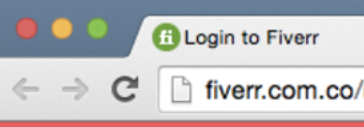
- When you login to Bricoly, you will always see “https” prefix (or a lock sign) in the beginning of the URL (the website address).
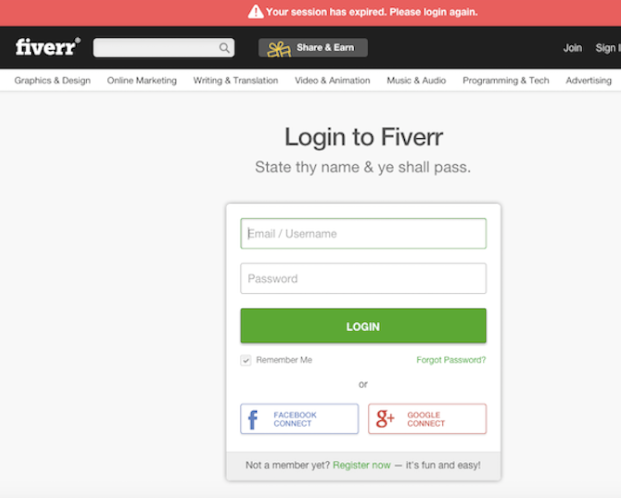
- In the example below, a phishing site (pretending to be Bricoly.com), was reported and closed. It looked like this and lacked the mentioned “https” prefix or lock sign:
- Emails or chat messages claiming that you’ve won a prize, a discount or a special offer.
- Email warnings that your information has been compromised and you need to click the link and login to secure it.
- Fake messages from Bricoly staff: Look out to see if Bricoly is spelled wrong (e.g. Bricoly, Bricoly etc.). Email addresses can possibly have foreign or alternative domain suffixes (e.g. .it, .de, .ru, .so).
If you ever receive a phishing link or a suspicious message, please contact our awesome Customer Support team.


