
Securing Your Account
Estimated reading time: 1 min
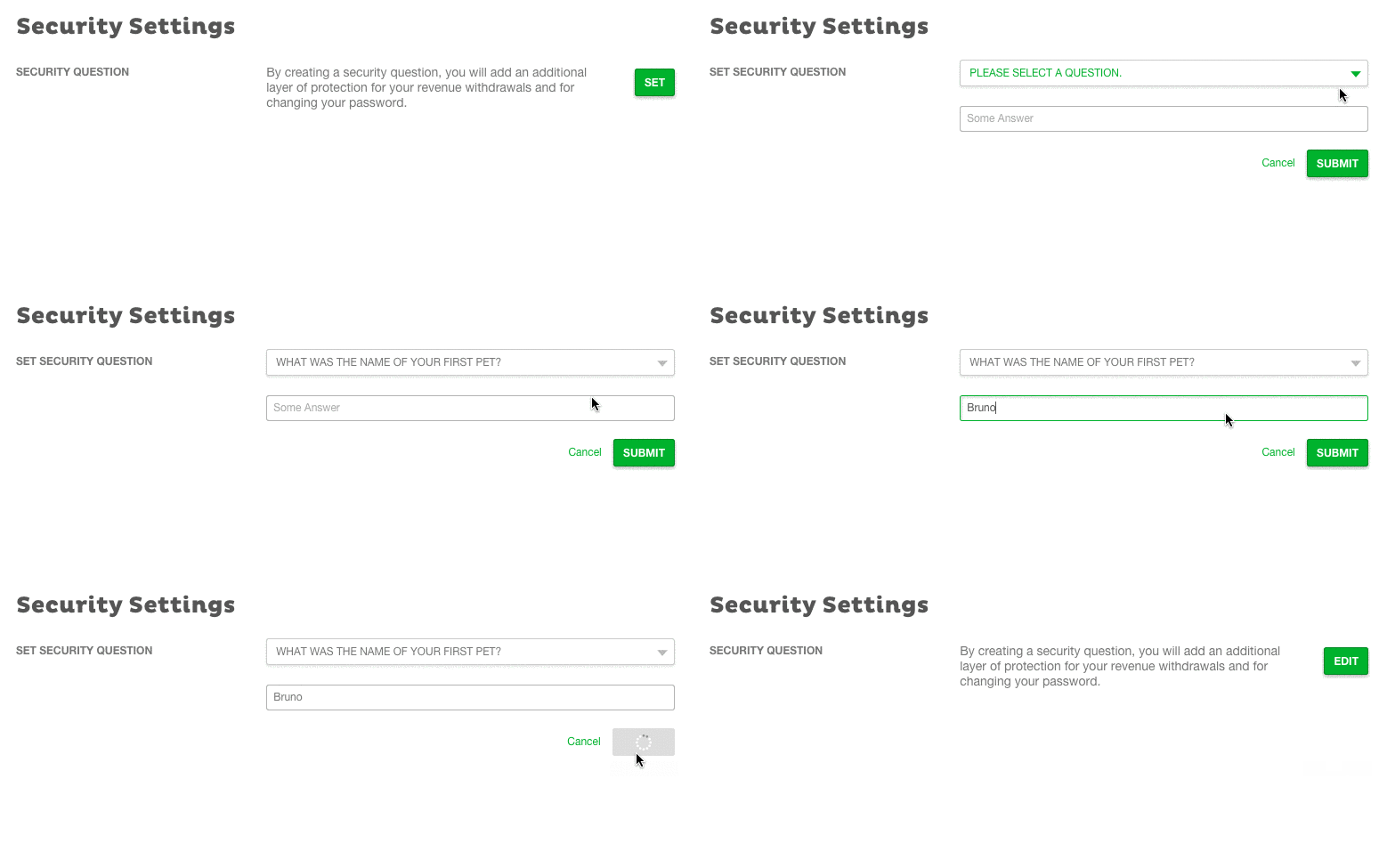
Securing your account is an important feature. It adds an additional layer of protection for your revenue withdrawals and for changing your password.
To secure your account:
- Once logged in, click your profile picture, and then click Settings > Security.
- In the SECURITY QUESTION area, click Set.
- From the PLEASE SELECT A QUESTION drop-down list, select a question that you feel comfortable with.
- Enter your answer in the field below the question and click Submit.
To edit your security settings:
- Once logged in, click your profile picture, and then click Settings > Security.
- In the SECURITY QUESTION area, click Edit.
- In the ANSWER SECURITY QUESTION area, provide the answer to the security question you set.
- In the SET SECURITY QUESTION area, from the PLEASE SELECT A QUESTION drop-down list, select a question that you feel comfortable with.
- Enter your answer in the field below the question, and click Submit.
Note: If you forget your security question, you will need to contact Customer Support to verify your account.


